# Strategic copytrading - HyperDash
### **Introduction**
HyperDash strategic copytrading allows you to replicate the **perpetual positions** of up to three selected wallets on Hyperliquid. Our system **replicates the combined exposure** of all traders simultaneously, enabling true portfolio construction rather than just simplistic position mirroring.
###
### Our philosophy
We are building an onchain fund-of-funds on Hyperliquid, and therefore built our risk management and execution systems with user longevity and capital effieciency in mind. Our strategic exposure-based approach to copytrading offers several critical advantages:
* **True diversification**
Copy multiple traders simulatenously (even with conflicting positions!) while our system automatically balances your net exposure across your entire portfolio.
* **Superior risk management**
We have built our risk management engine with user safety in mind. We meticulously account for different edge cases present in copy trading because we actually trade with this system ourselves. We will let you know of potential risk exposures flagged by our software.
* **Effortless strategy composition**
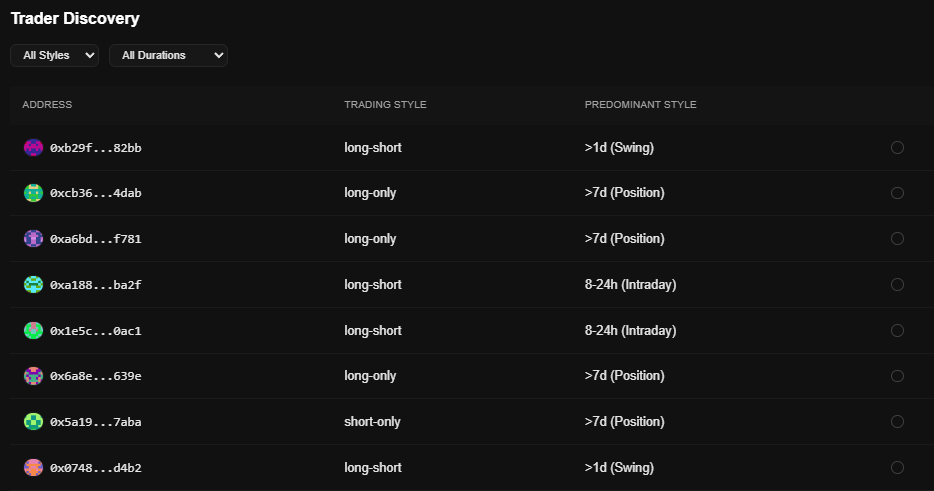
Combine scalpers with swing traders. Pair long-short traders with long-term long-only players. HyperDash Trader Discovery helps you find viable strategies so you can focus on selecting the right strategic mix.
* **Wallet security**
Last but not the least, you remain in control of your wallet and private keys. We utilize Hyperliquid's agent wallet infrastructure, meaning that we can only take trades for you.
We're building what we believe will be the best risk-optimized system for constructing portfolios of traders and their strategies on Hyperliquid. Our current closed beta focused on proper exposure management and risk distribution - with much more to come.
If you've been whitelisted, here's how to get started.
# Initial Setup
1. **Add Trading Addresses**\
First, choose **one to three** trading addresses that you’d like to copy. For more information on which wallets might be good targets, refer to the Recommendations for Choosing Traders section. You can also use our **Trader Discovery** feature on the copytrading page.
2. **Create Agent Wallet**\
Generate a dedicated **agent wallet** specifically for copytrading. This wallet cannot deposit or withdraw funds; it simply executes trades on your behalf.
3. **Approve Builder Fee**\
You must authorize a **5 basis-point (0.05%)** builder fee for each order placed by the agent wallet. This fee covers the operational costs of copytrading.
4. **Start Copytrading**\
After clicking **Start Copytrading**, you will begin mirroring positions opened by the copied addresses. In Settings (next to the trader addresses) you will be able to choose whether you want *all positions to be copied on a start* or *only positions with favorable entries to be copied.*
# Recommendations for Choosing Traders
* **Choose Directional Traders // ****Avoid Market Makers**\
It’s generally preferable to copy traders who pursue clear, directional strategies, rather than those relying heavily on funding rate strategies or market-making. Directional traders usually have few concentrated positions running - on the other hands, market makers or funding rate arbers are not as selective and have a lot of positions running at the same time (this is a **red flag**).
* **Avoid Over-Reliance on Limit Orders**\
You risk partial fills or missed entries if a trader primarily uses tight limit orders for strategies such as bidding liquidations. Look for directional time-frame traders whose entries and exits are more straightforward to replicate.
* **Medium Timeframe is the Best**\
Traders who scalp in and out of positions are not good fits for copytrading since they rely a lot on precise exits and entries. Choose traders who have trade holding time in hours and days rather than minutes.
* **Verify Trading History**\
The best wallets to copy are those with a consistent track record of outperformance—or at least effective drawdown management—across various market conditions. Use Hyperdash to view past orders, PnL curves, and more.
* **Choose Traders with >30k Equity**\
To prevent the potential copytrader abuse, we put a minimum cap on trader's equity before it is possible to start copytrading them. This way you are protected from sudden withdrawals and malicious actors.
# Using HyperDash to find traders
There are a few ways to find winning traders on HyperDash.\
\
**Trader Discovery v1.0**
If you are whitelisted for copytrading, you are able to access Trader Discovery v1.0. There you can find a list of winning traders and their estimated style.
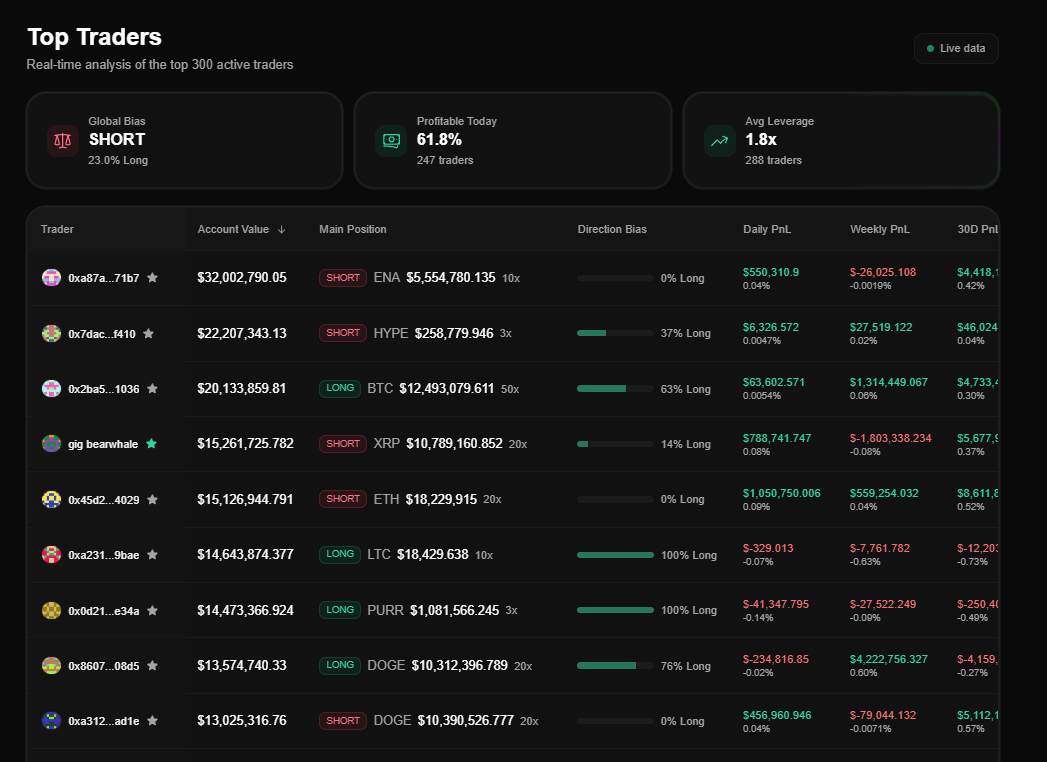
**Top traders**
You can take a look at winning traders across a time period (1D/7D/etc) and analyze their wallets to see if they are consistent winners. Clicking **Advanced stats** can help to see their favorite tickers, holding duration and so on.
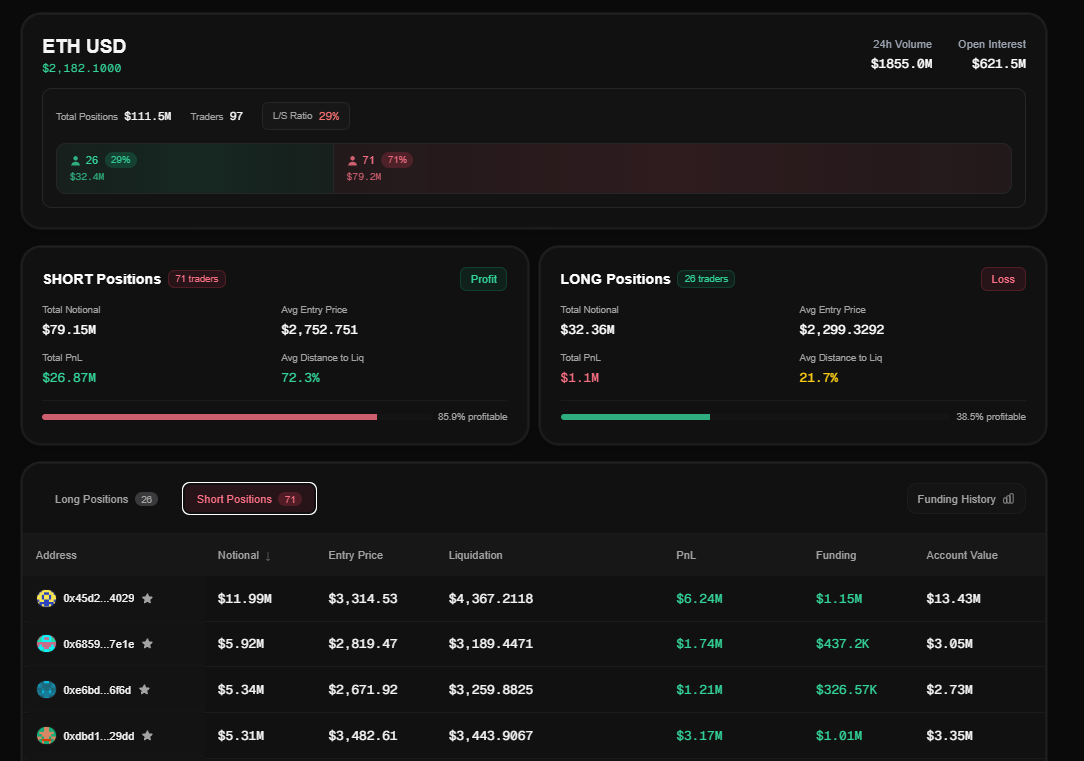
**Ticker view**
Looking through the ticker view can help find traders who are bullish or bearish on a certain ticker. This is a good way to find traders who align with your bias for certain tickers (say, bullish BTC or bearish SUI) and add them to your watchlist to copytrade later.
# How Exposure-based Copytrading Works
Unlike traditional copytrading that simply mirrors individual positions, our system build a true portfolio based on the combined exposure of all traders you follow.
Copytrading uses **your main account** to fully replicate the positions of the wallet(s) you choose to follow. This includes replicating the **leverage** used by the copied traders. For instance, if they take a position using 2x leverage on their entire account, your account will do the same.
#### We are copying trader(s) exposure!
That means that our copytrading is set up in a way to replicate combined traders' exposure. You shouldn't worry about your fills matching 1:1 to the traders which you copy. Our execution system might take some trades to bring the exposures to the desired levels.
# Sizing and Risk Parameters
### **Sizing and risk parameters**
Position sizing depends on the **amount of traders** you are copytrading. As an example, if you are copytrading 2 traders and one of them is levered 3x and the other is flat (no positions), you are going to be *1.5x levered*.
*Soon you will be able to set up stop losses on your copied positions.*
#### Leverage settings (!)
During the testing period maximum leverage that your account can have varies on the amount of traders that you follow.
* 6x if you follow 1 trader
* 4x if you follow 2 traders
* 3x if you follow 3 traders
If you follow a single trader and they leverage more than 6x, the system will adjust the exposure back to the maximum leverage. To **avoid unnecessary trade churning**, you can do the following:
* Diversify to 2 or 3 traders so their combined leverage is less than 6x
* If copytrading a single wallet, make sure that you choose one that does not lever more than 6x
# Best and Worst Practices
#### 😺Depositing More
If you deposit more to your copytrading account, your positions will increase accordingly to maintain the same exposure. Similarly, withdrawing money will decrease your positions. If you don't want your current entries to be changed, wait until the current trades resolve and close before adjusting your balance.
#### 💀Do Not Manually Override Trades
In the current iteration, manual attempts to override or close copytraded positions will simply cause them to be re-entered by the system to maintain proper exposure. If you want to stop following a particular trader, go to Hyperdash and remove them from your copytrading account list.
Note: Stopping copytrading prevents new trades from opening, but existing positions will not be closed. You will need to close them manually if desired.
# Disclaimers
* All trading involves risk, and past performance does not guarantee future results.
* Hyperdash only provides the technology to copy traders on Hyperliquid and does not guarantee the future performance of these traders.
* Technical issues are always possible as Hyperdash is a nascent platform. Technical risk is as important as trading risk.
# FAQ and Support
### **FAQ and Support**
Several reasons may explain why a position wasn’t replicated:
* After adjusting for account size, your trade is below the **$10 minimum** order threshold.
* The trader already held this position before you began copytrading.
For any additional help, please contact us on Discord. We’re here to assist with any specific questions or issues you may have.